

 1 month ago
21
1 month ago
21
PROTECT YOURSELF with Orgo-Life® QUANTUM TECHNOLOGY
Orgo-Life the new way to the future Advertising by AdpathwayA weak capture card can make a strong streaming setup feel broken. The game looks fine on your monitor, but the stream stutters. The colors look washed out. The audio refuses to behave. Or worse, you spend money on a card that technically works but quietly limits your refresh rate, resolution, or HDR setup.
You can open Table of Contents show
That is why the best capture cards streaming creators should consider are not always the most expensive ones. A Twitch streamer playing at 1080p does not need the same device as someone recording 4K footage from a PS5, Xbox Series X, gaming PC, or high-refresh-rate monitor.
The smart choice depends on what you stream, what you play on, what resolution you want to capture, and whether you need simple plug-and-play reliability or serious HDMI 2.1 headroom.
Our Selection Criteria
A capture card should solve a real streaming problem, not just add another box to the desk. For this list, the focus was on practical streaming use rather than spec-sheet bragging.
The selection was based on these filters:
- Capture quality: 1080p60 is still enough for many live streams, but 4K capture matters for creators who record high-quality YouTube footage.
- Passthrough support: A good card should not punish your actual gaming experience. Modern players may need 4K60, 1440p120, VRR, HDR, or higher refresh-rate passthrough.
- Ease of setup: Streamers already deal with OBS, audio routing, overlays, cameras, scenes, and chat. A capture card should not become the hardest part.
- Platform fit: Some cards suit consoles. Some are better for dual-PC setups. Some are better for cameras or hybrid audio-video streaming.
- Long-term value: A cheaper 1080p card can be the right buy for beginners, but serious creators may save money by buying more headroom once.
Here is a quick snapshot before going deeper into each option.
| AVerMedia Live Gamer Ultra 2.1 | High-end external HDMI 2.1 streaming | Up to 4K144 on Windows, 4K60 on macOS | More than many beginners need |
| Elgato Game Capture 4K X | Premium external capture | High-refresh 4K and 1440p capture | Costs more than simpler USB cards |
| Elgato Game Capture 4K S | Mainstream 4K60 streaming | 4K60 capture in a compact USB card | HDMI 2.0, not HDMI 2.1 |
| AVerMedia Live Gamer Ultra S | Strong 4K60 value | 4K60, 1440p144, 1080p240 capture | Software experience may not suit everyone |
| Elgato HD60 X | Reliable console streaming | 1080p60 HDR capture, strong passthrough | 4K capture is limited to 30fps |
| Elgato Game Capture Neo | Simple beginner streaming | 1080p60 capture, 4K60 HDR passthrough | Not for 4K capture workflows |
| NZXT Signal 4K30 | Clean mid-range option | 4K30 or 1080p60 capture | Less ecosystem support than Elgato |
| Razer Ripsaw HD | Simple 1080p60 streaming | 1080p60 capture with 4K60 passthrough | Older feature set |
| RODE Streamer X | Audio-video streaming desk setup | Capture card plus audio interface | Not the cheapest way to capture gameplay |
| Elgato Game Capture 4K Pro | Internal PCIe PC setup | 4K60 capture, high-end passthrough | Requires desktop PCIe slot |
| AVerMedia Live Gamer 4K 2.1 | Internal HDMI 2.1 alternative | 4K60 capture, 4K144/4K120 passthrough | Windows desktop-focused |
Who This Is For
This list is for creators who want better control over game capture than built-in console recording, screen capture software, or basic USB dongles can provide.
It is especially useful for:
- Console streamers using PS5, Xbox Series X/S, Nintendo Switch, or older HDMI consoles
- PC streamers building a dual-PC setup
- YouTube creators recording higher-quality gameplay footage
- Streamers who want to use a mirrorless or DSLR camera as a clean HDMI source
- Creators who care about refresh rate, HDR, VRR, or audio routing
If you only stream PC games from one computer and your performance is already stable in OBS, you may not need a capture card at all. But if you stream from a console, capture from another PC, or want cleaner camera input, the right card can make the whole setup easier.
11 Best Capture Cards Streaming Creators Should Compare First
The list below does not rank every device by raw power. A beginner-friendly 1080p card can be a better recommendation than a premium HDMI 2.1 card if the streamer only needs a clean 1080p feed.
That said, modern cards have improved a lot. The better models now focus not only on capture quality, but also on preserving the way you actually play.
1. AVerMedia Live Gamer Ultra 2.1
The AVerMedia Live Gamer Ultra 2.1 is one of the strongest external options for streamers who want modern HDMI 2.1 support without installing a PCIe card. It supports high-end passthrough options such as 4K144, 1440p240, 1080p360, HDR, and VRR, which matters if you play on a high-refresh monitor and do not want the capture card to hold the display back.
This is the kind of card that makes sense for serious console and PC creators. It is not necessary for every Twitch streamer, especially if the final stream is still 1080p. But for recording, editing, future-proofing, and high-refresh gameplay, it has the headroom many older USB cards lack.
Best for: high-end external capture with HDMI 2.1 flexibility
- Creators using PS5, Xbox Series X/S, gaming PCs, or high-refresh monitors
- Streamers who want strong passthrough without moving to an internal card
Why We Chose It:
- Supports modern HDMI 2.1 workflows.
- Handles high-refresh passthrough for serious gaming setups.
- Offers stronger future-proofing than basic 1080p or HDMI 2.0 cards.
- Works well for creators who record as much as they stream.
Things to consider:
- Beginners may not use most of its advanced features.
- Full high-end capture workflows still depend on the computer and software setup.
2. Elgato Game Capture 4K X
The Elgato Game Capture 4K X is a premium external capture card for streamers who want strong performance without opening a desktop PC. It supports HDMI 2.1, USB 3.2 Gen 2, high-refresh passthrough, VRR, HDR, and capture options that go beyond basic 4K30.
Its biggest advantage is the balance between hardware strength and Elgato’s broader creator ecosystem. Many streamers already use Elgato lights, Stream Deck devices, microphones, or software, so adding a 4K X can feel cleaner than mixing several brands.
For most casual streamers, this is more power than needed. For creators who want a portable but serious card, it is one of the safest premium choices.
Best for: premium external capture in an Elgato-based streaming setup
- Streamers who want HDMI 2.1 without a PCIe card
- Creators who already use Elgato software or gear
Why We Chose It:
- Strong capture and passthrough support for modern gaming setups.
- Portable external design.
- Good fit for PS5, Xbox, PC, Mac, and other HDMI sources.
- Better long-term option than older 1080p-focused cards.
Things to consider:
- Not the cheapest route to a clean 1080p stream.
- To use its higher-end modes properly, the rest of the setup must keep up.
3. Elgato Game Capture 4K S
The Elgato Game Capture 4K S is easier to recommend to more people than many ultra-premium capture cards. It supports 4K60 capture, 1440p120 passthrough, 1080p240 passthrough, VRR, HDR passthrough, and 1080p60 HDR capture on Windows.
That makes it a strong middle ground for console streamers and creators who want clean 4K recording without jumping straight to the most expensive HDMI 2.1 options. It also has the familiar external USB-C setup that most users can understand quickly.
The main limitation is that it is an HDMI 2.0 device. If you need 4K120 or 4K144 passthrough, look higher up the list.
Best for: mainstream 4K60 streaming and recording
- Console streamers who want a polished external capture card
- Creators who want better quality than older 1080p cards
Why We Chose It:
- Strong 4K60 capture for a compact external card.
- Better fit for many creators than paying extra for HDMI 2.1.
- Supports modern apps such as OBS-style workflows.
- Good balance between quality, simplicity, and streaming practicality.
Things to consider:
- HDMI 2.0 means less high-refresh 4K headroom.
- HDR capture support can vary by platform and setup.
4. AVerMedia Live Gamer Ultra S
The AVerMedia Live Gamer Ultra S is a strong choice for creators who want 4K60 capture without jumping into the highest price tier. It supports capture options up to 4K60, 1440p144, and 1080p240, which gives it enough flexibility for streamers who record high-quality footage and still care about smooth gameplay.
This card is especially interesting because it sits in a practical middle area. It is more capable than a basic 1080p model, but not as extreme as the newest HDMI 2.1 units. That makes it worth comparing against the Elgato 4K S.
The hardware looks strong on paper, but software preference matters. Some creators may still prefer Elgato’s interface and ecosystem.
Best for: value-focused 4K60 external capture
- Creators who want strong specs without overbuying
- Streamers comparing Elgato and AVerMedia mid-range cards
Why We Chose It:
- Captures up to 4K60.
- Supports higher frame-rate options at lower resolutions.
- Good fit for modern console and PC streaming setups.
- Offers serious capability without needing a PCIe slot.
Things to consider:
- Software experience may be less familiar to Elgato users.
- Always check supported modes for your exact platform and streaming software.
5. Elgato HD60 X
The Elgato HD60 X remains a sensible pick for streamers who want reliability more than maximum specs. It can capture 1080p60 HDR and 1440p60, with 4K30 capture available for creators who need it. The passthrough side is stronger, with support for 4K60, 1440p120, 1080p240, VRR, and HDR.
This card fits a very common streamer profile: someone plays on a modern console or PC, wants smooth passthrough, but mainly streams at 1080p. That is still a normal streaming target because many viewers watch on phones, laptops, or connections where 4K streaming is not the priority.
It is no longer the newest Elgato option, but it is not suddenly useless. It is still a good buy when priced well.
Best for: reliable 1080p and 1440p streaming
- Streamers who want dependable console capture
- Creators who do not need full 4K60 capture
Why We Chose It:
- Good passthrough support for modern gaming displays.
- Strong fit for 1080p60 streaming.
- Mature device with wide streamer familiarity.
- Useful for PS5, Xbox, Switch, and dual-PC setups.
Things to consider:
- 4K capture is limited compared with newer 4K S and HDMI 2.1 cards.
- Check pricing carefully, because newer cards may be close in cost.
6. Elgato Game Capture Neo
The Elgato Game Capture Neo is for people who want a clean start without buying more capture card than they need. It captures up to 1080p60 and supports 4K60 HDR passthrough, which is enough for many console streamers who publish live content rather than high-end 4K recordings.
Its appeal is simplicity. A beginner can connect the console, display, and computer without studying every HDMI mode or wondering which advanced feature matters. For a first streaming setup, that has real value.
This is not the card to buy if 4K recording is part of the plan. It is better viewed as a clean, modern entry point.
Best for: beginner-friendly 1080p60 streaming
- New streamers who want simple setup
- Console players who stream at 1080p
Why We Chose It:
- Captures the resolution most live streamers still use.
- Supports 4K60 HDR passthrough for smoother gameplay experience.
- Simple external USB design.
- Makes more sense than overbuying for a basic streaming channel.
Things to consider:
- Not suitable for 4K capture.
- Creators planning serious YouTube recording may outgrow it.
7. NZXT Signal 4K30
The NZXT Signal 4K30 is a clean, no-drama option for creators who want 4K30 capture or 1080p60 streaming with 4K60 HDR passthrough. It is not surrounded by the same creator ecosystem as Elgato, but the device itself makes sense for a simple streaming desk.
This card works best when the requirement is clear: capture from a console, camera, phone, or second PC and send the feed into streaming software. It does not need to be the flashiest option to be useful.
The main reason to compare it is value. If the price is right in your region, it can be a smart alternative to better-known cards.
Best for: simple 4K30 or 1080p60 capture
- Streamers who want a straightforward external card
- Creators who do not need HDMI 2.1 features
Why We Chose It:
- Useful capture options for common streaming needs.
- Supports 4K60 HDR passthrough.
- Works with standard streaming software workflows.
- Good alternative when Elgato or AVerMedia cards cost more locally.
Things to consider:
- Less ecosystem depth than Elgato.
- Not ideal for high-refresh 4K gaming capture.
8. Razer Ripsaw HD
The Razer Ripsaw HD is an older but still understandable choice for simple 1080p60 streaming. It supports 1080p capture and 4K60 passthrough, which fits creators who want to play in 4K but stream in Full HD.
Its audio input and output options can also be useful for streamers who want basic audio mixing without building a larger audio setup. That said, the capture card market has moved forward. Newer models offer better HDR, VRR, and higher-resolution capture options.
This is worth considering only if the price is attractive or if someone specifically wants a simple Razer-branded setup.
Best for: basic 1080p60 streaming with 4K passthrough
- Razer ecosystem users
- Streamers who find it at a good price
Why We Chose It:
- Simple Full HD capture.
- 4K60 passthrough keeps gameplay sharper than the stream.
- Includes useful audio connectivity.
- Still practical for creators who do not need modern HDMI 2.1 features.
Things to consider:
- Not as future-proof as newer cards.
- Better options now exist for HDR, VRR, and 4K capture.
9. RODE Streamer X
The RODE Streamer X is different from the other cards here. It is not only a capture card. It combines video capture, an audio interface, and basic control functions in one compact device.
That makes it useful for streamers who care as much about microphone quality and desk simplicity as they do about game capture. It supports up to 4K30 capture and 4K60 passthrough, with VRR support, plus serious audio inputs such as an XLR combo jack.
This is not the cheapest way to capture gameplay. It makes more sense for creators who want fewer devices on the desk and better audio control in one unit.
Best for: streamers who want capture and audio in one device
- Creators using XLR microphones
- Streamers who want a cleaner desk setup
Why We Chose It:
- Combines capture card and audio interface.
- Useful for voice-focused streamers and creators.
- Supports higher-quality microphone workflows.
- Reduces the need for separate audio hardware.
Things to consider:
- Not the best choice if you only need basic game capture.
- 4K capture tops out lower than specialist high-end capture cards.
10. Elgato Game Capture 4K Pro
The Elgato Game Capture 4K Pro is built for desktop PC streamers who want an internal capture card instead of another USB device on the desk. It uses PCIe and supports high-end passthrough up to 8K60, 4K240, 1440p240, and 1080p240, with VRR, HDR, and ALLM support.
For actual capture, it supports up to 4K60, 1440p144, and 1080p240. That is more than enough for many serious recording and streaming workflows.
This is overkill for a casual console streamer. But for a dedicated streaming PC, a clean internal card can reduce desk clutter and give the setup a more permanent feel.
Best for: internal PCIe capture in a serious desktop setup
- Dual-PC streamers
- Creators who want a permanent internal capture solution
Why We Chose It:
- Strong capture and passthrough capability.
- Fits cleanly inside a desktop PC.
- Good match for dedicated streaming machines.
- Works well for high-end game recording workflows.
Things to consider:
- Requires a compatible desktop PC and PCIe slot.
- Not useful for laptop-based streamers.
11. AVerMedia Live Gamer 4K 2.1
The AVerMedia Live Gamer 4K 2.1 is another strong internal option for creators who want HDMI 2.1 support inside a desktop PC. It supports 4K60 capture and high-end passthrough such as 4K144 and 4K120, which makes it relevant for modern console and PC setups.
This card should be compared closely with the Elgato 4K Pro. Both are aimed at creators who are more serious about streaming or recording than the average beginner. The better choice may come down to software preference, local pricing, and the rest of the setup.
If you stream from a laptop, skip it. If you are building a dedicated capture PC, it belongs on the shortlist.
Best for: internal HDMI 2.1 capture outside the Elgato ecosystem
- Desktop streamers who prefer AVerMedia
- High-end console and PC capture setups
Why We Chose It:
- Strong HDMI 2.1 support.
- Good fit for high-refresh passthrough.
- Captures up to 4K60 for serious recording.
- Useful alternative to Elgato’s internal 4K Pro.
Things to consider:
- Requires a desktop PC with a compatible PCIe slot.
- Software and driver preference should influence the final choice.
An Overview of the 11 Best Capture Cards
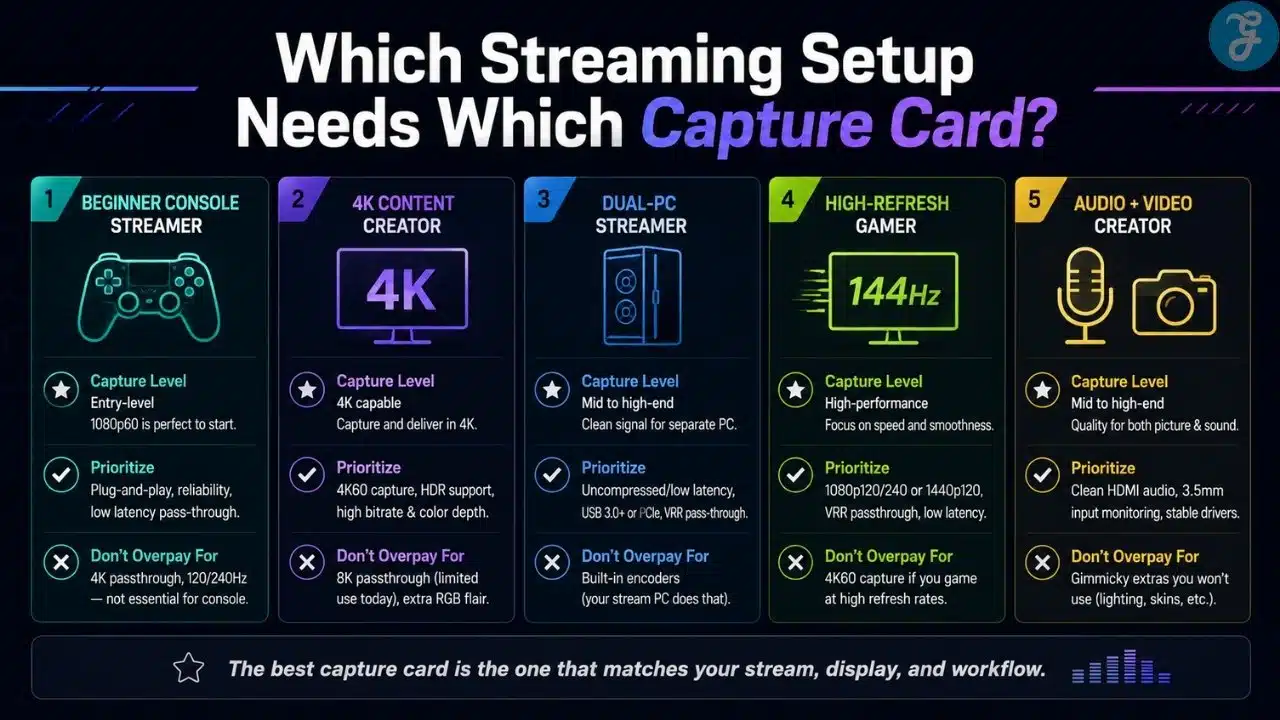
Most streamers should not start by asking, “What is the most powerful capture card?” A better question is, “What is the weakest part of my setup right now?”
If the answer is console capture, a simple 1080p60 or 4K60 USB card may be enough. If the answer is high-refresh passthrough, look at HDMI 2.1. If the answer is audio chaos, the RODE Streamer X may solve more than a normal capture card would.
Overview Comparison
| Rank | Capture Card | Best Match | Capture Target | Passthrough Strength |
| 1 | AVerMedia Live Gamer Ultra 2.1 | High-end external users | Up to 4K144 on Windows, 4K60 on macOS | 4K144, 1440p240, 1080p360, HDR, VRR |
| 2 | Elgato Game Capture 4K X | Premium external users | Up to 4K144 in supported modes | 4K144, 1440p240, HDR, VRR |
| 3 | Elgato Game Capture 4K S | Mainstream 4K creators | Up to 4K60 | 4K60, 1440p120, 1080p240, HDR, VRR |
| 4 | AVerMedia Live Gamer Ultra S | Value-focused 4K creators | Up to 4K60 | 4K60, 1440p144, 1080p240, HDR, VRR |
| 5 | Elgato HD60 X | Console streamers | 1080p60 HDR, 1440p60, 4K30 | 4K60, 1440p120, 1080p240, HDR, VRR |
| 6 | Elgato Game Capture Neo | Beginners | 1080p60 | 4K60 HDR |
| 7 | NZXT Signal 4K30 | Simple external setups | 4K30 or 1080p60 | 4K60 HDR |
| 8 | Razer Ripsaw HD | Basic 1080p streaming | 1080p60 | 4K60 |
| 9 | RODE Streamer X | Audio-video creators | Up to 4K30 | 4K60, VRR |
| 10 | Elgato Game Capture 4K Pro | Internal desktop capture | Up to 4K60 | Up to 8K60 and 4K240 in supported modes |
| 11 | AVerMedia Live Gamer 4K 2.1 | Internal HDMI 2.1 setups | Up to 4K60 | 4K144 and 4K120 support |
Our Top 3 Picks And Why?
For this topic, a top-three section makes sense because buyers can easily overbuy or underbuy. These three options cover the most common serious streaming needs.
| Pick | Why It Stands Out | Best Buyer |
| AVerMedia Live Gamer Ultra 2.1 | Strong external HDMI 2.1 feature set | High-end console and PC creators |
| Elgato Game Capture 4K S | Balanced 4K60 capture without extreme specs | Most mainstream creators moving beyond 1080p |
| Elgato Game Capture Neo | Simple 1080p60 setup with modern passthrough | Beginners who want fewer complications |
The Elgato 4K X could easily replace the AVerMedia Ultra 2.1 for creators already using Elgato gear. For desktop capture PCs, the Elgato 4K Pro and AVerMedia Live Gamer 4K 2.1 are better than any USB card if the setup is permanent.
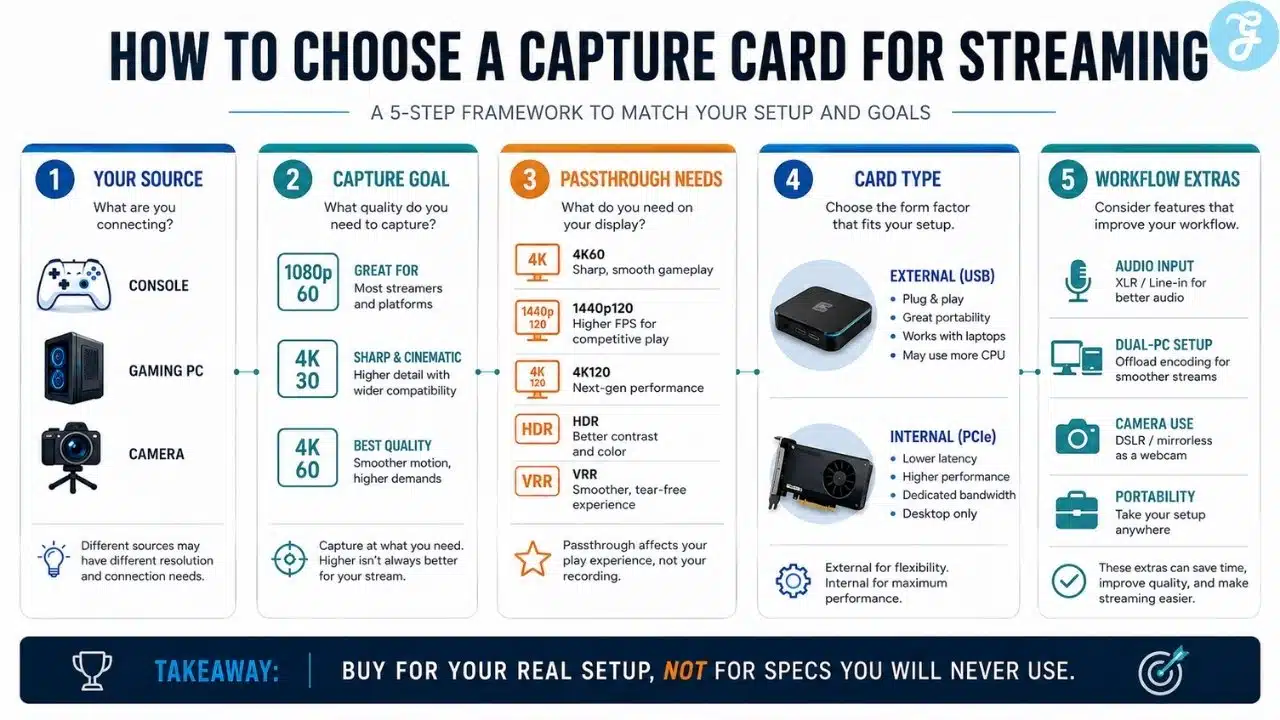
How To Choose The Best Capture Card For Your Streaming Setup?
A capture card should match the way you actually stream. Buying for imaginary future needs can waste money. Buying too low can force an upgrade too soon.
Use this simple framework before choosing.
- Start with your final output: If you stream mainly at 1080p60, a 4K144 capture card is not automatically necessary. It may still help passthrough, but it will not magically make a compressed live stream look cinematic.
- Check your gaming display: If you play at 1440p120, 4K120, VRR, or HDR, the passthrough spec matters as much as capture resolution.
- Choose external or internal early: External USB cards suit laptops, consoles, travel, and flexible setups. Internal PCIe cards suit dedicated desktop streaming PCs.
- Do not ignore audio: Some cards include analog audio input, while others expect you to handle microphone, game audio, party chat, and monitoring separately.
The Final Checklist
Before buying a capture card, check these five points:
- What resolution and frame rate do you actually stream or record?
- Does the card support your monitor’s passthrough resolution and refresh rate?
- Do you need HDR, VRR, or 1440p/4K high-refresh support?
- Will you use a laptop, desktop PC, console, camera, or dual-PC setup?
- Does your streaming software support the card cleanly without awkward workarounds?
If one of those answers is unclear, pause before buying. Capture card problems usually come from mismatched setups, not from the card being “bad” in isolation.
What Streamers Should Stop Overpaying For
The uncomfortable truth is that many streamers do not need the most powerful capture card on the shelf. A clean 1080p60 stream with good lighting, stable audio, readable overlays, and no frame drops will look better than a chaotic 4K setup with bad sound and unstable scenes.
That does not mean high-end cards are pointless. They are valuable when the rest of the workflow can use them. If you record for YouTube, play at high refresh rates, use a dedicated streaming PC, or want to avoid replacing your card in a year, premium HDMI 2.1 options make sense.
For many creators, though, the better move is to buy a card that matches the current setup and spend the remaining budget on a microphone, lighting, SSD storage, or a stronger internet connection. The best capture cards streaming creators should buy are not the ones with the biggest numbers. They are the ones that remove friction from the stream without creating new problems.
Frequently Asked Questions (FAQs) About Best Capture Cards Streaming Creators Should Know
Do I Need A Capture Card For Streaming?
You need a capture card if you want to stream from a console, another PC, or a camera with HDMI output. If you only stream games from the same PC you play on, OBS or similar software may be enough.
Is 1080p60 Still Good For Streaming?
Yes. 1080p60 is still a practical target for Twitch, YouTube, and many gaming streams. It is easier to run, easier to upload, and often better for viewers with average internet connections.
Is A 4K Capture Card Worth It?
A 4K capture card is worth it if you record high-quality footage, make YouTube videos, or want stronger future-proofing. For live streaming only, many creators can still stay with 1080p60.
Should I Choose External Or Internal Capture Cards?
External capture cards are better for laptops, consoles, flexible desks, and travel. Internal PCIe capture cards are better for permanent desktop setups and dedicated streaming PCs.
What Is More Important, Capture Resolution Or Passthrough?
Both matter, but passthrough is often ignored. If the card limits your gaming monitor to a lower refresh rate or disables features you use, the streaming setup will feel worse even if the capture looks fine.























 English (US) ·
  French (CA) ·
  French (FR) ·