

 6 hours ago
26
PROTECT YOURSELF with Orgo-Life® QUANTUM TECHNOLOGY
Orgo-Life the new way to the future Advertising by AdpathwayAn AI extractor reads an invoice and returns a record with every required field. The JSON parses and the schema validator accepts it. Then the importer matches supplier code 00047 to supplier 47, or interprets a missing discount as zero. The record looks ready because it has the expected shape. The error is in what the fields mean.
AI-generated structured data needs checks at three points: the API response, the record’s structure, and the values the receiving system will use. The nine cases below are test fixtures for teams moving model-generated JSON into an application, database, or automation. The examples use fictional inputs and expected results so teams can adapt them to their own workflow.
You can open Table of Contents show
1. The source omits a field, but the model fills it anyway
A form leaves the discount blank. The extractor returns discount: 0, even though the source never says there was no discount. That substitution can change later calculations or erase the distinction between “not reported” and “none.”
Put four inputs side by side: a blank field, an explicit zero, an illegible value, and a field that does not apply. Write down the expected output for each before calling the model. JSON Schema distinguishes a property with the value null from an absent property. If your workflow needs several kinds of missing information, use an explicit status alongside the value and document the combinations your importer accepts.
2. An identifier looks like a number
Supplier code 00047 should retain all five characters when the leading zeros are part of its identity. A model can return 47, or a downstream spreadsheet can strip the zeros after the model has returned the correct string. Both failures can produce a valid-looking identifier for the wrong record.
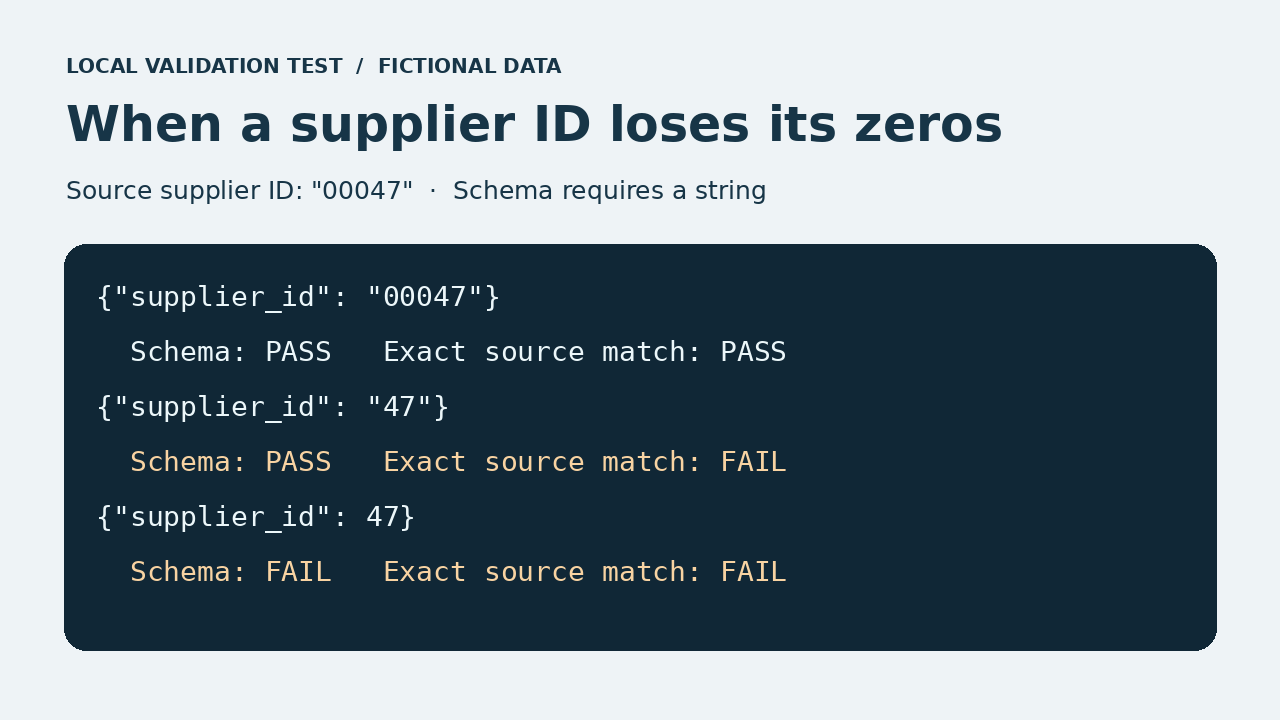 A string schema catches the numeric 47, but an exact source comparison catches the missing zeros in “47”
Use strings for identifiers that need exact preservation. Test one with leading zeros, one with a letter suffix, and one long enough to reveal unwanted numeric conversion. Compare the original and stored values after the full import and export cycle. For supplier-invoice workflows, the distinction between reading the document and creating a record an ERP can accept is also worth checking when comparing invoice OCR APIs.
3. A date or amount has two plausible interpretations
The string 03/04/2026 can refer to March 4 or April 3. The value 1.250 can mean one and a quarter or one thousand two hundred fifty. A normalized date or number can pass validation even when the model chose the wrong interpretation.
Keep the source text alongside the normalized value where the distinction matters. Set a locale using reliable document or account metadata. If that information is missing, route ambiguous cases for review or use an explicit unresolved status permitted by the contract. Add a second fixture with a nearby label that resolves the ambiguity. That checks whether your pipeline can use evidence when it is available.
4. A source label falls outside the allowed categories
Imagine the schema allows paid, unpaid, and void. The source says “partially paid.” Forcing the model to pick from the three options can obscure what happened. An allowed enum value tells you the answer fits the list. You still need to decide whether the list covers the business states you receive.
Add the missing state if it has a defined downstream meaning. Otherwise, provide a review path and retain the original label. Include a valid synonym in the test data so the pipeline also demonstrates it can normalize expected variation, such as mapping “settled” to “paid” when your rules define them as equivalent.
5. Table values land on the wrong row
Two items on an invoice have nearly identical names. One description wraps over two lines, and the quantity on the next line is assigned to the preceding item. Every row can contain the right keys and valid values while an individual item is still wrong.
Build a fixture with similar item names, different quantities, and a wrapped row near a page break. Compare each row to a reference you can identify, such as its SKU and row position. Where the source allows it, reconcile row amounts and the document total as a second check. Two swapped values can still add up to the expected total.
6. Repeated extraction produces duplicate records
An automation times out and retries after the first attempt has already written a record. A separate problem can arise when two legitimate rows happen to have the same description. A loose deduplication rule may either keep a duplicate or throw away a real purchase.
Run the same input twice with the same request or source identity. Confirm that it produces the intended number of stored records. Then submit a source with two legitimate, identical-looking rows and confirm that both remain. Decide which identifiers establish sameness at the document and line-item levels. Editorialge’s test cases for AI negative prompt records give a related example of why job IDs matter when matching asynchronous results.
7. Individual values pass, but they contradict one another
An invoice returns a subtotal of 100, a tax amount of 10, and a total of 130. Each value can meet the field type. The relationship needs a separate check. The same issue appears when an end date precedes a start date or when an item’s currency differs from its parent record.
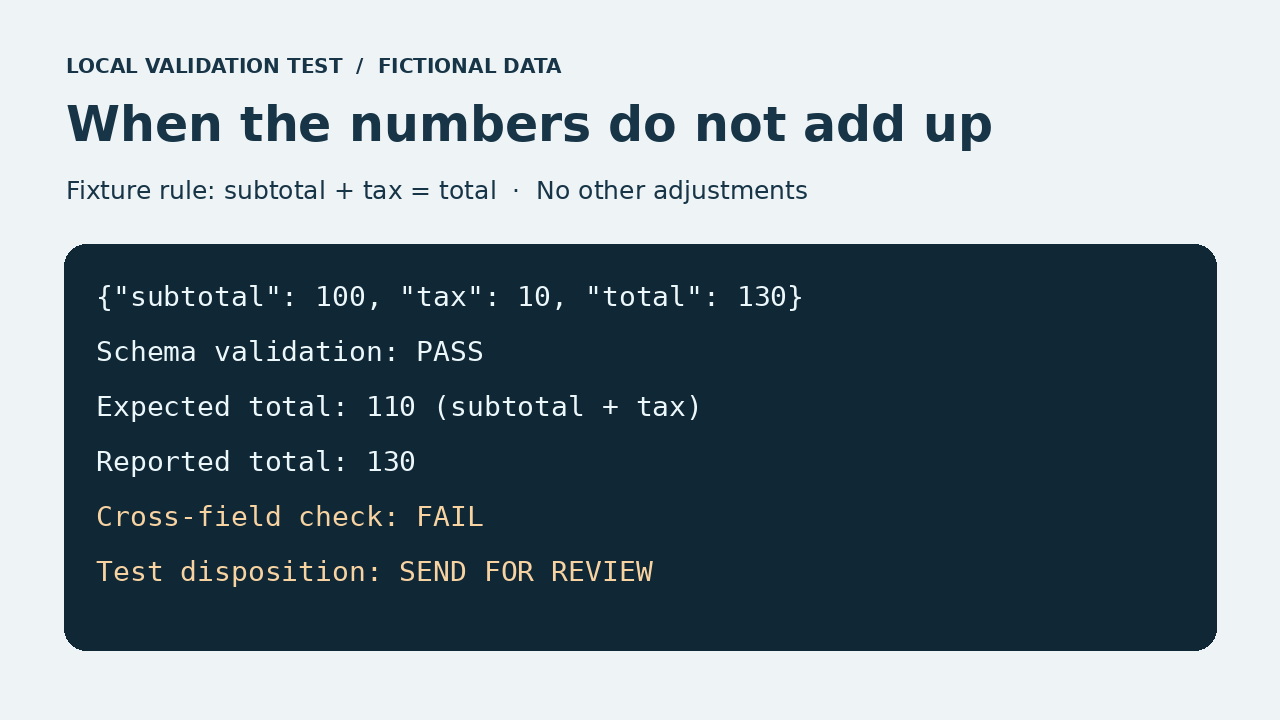 All three fields pass the schema’s numeric type checks. The cross-field rule flags the record for review because the subtotal plus tax is 110 and the reported total is 130
Write rules for relationships the receiving system depends on. Where documents include shipping, discounts, or rounding, account for those before treating a mismatch as an error. A rule should identify the fields and expected relationship so a reviewer can trace the discrepancy instead of receiving a vague “invalid data” message.
8. The response is refused or incomplete
A response can end before the structured record is complete. The provider may also return a refusal in a separate response field. In its Structured Outputs documentation, OpenAI describes how to handle refusals and check for incomplete responses before consuming parsed data. Follow the response contract for the specific API or SDK you use.
Test the refusal and incomplete branches with saved fixtures or mocked API responses. A partial record can look usable when the first few keys are present. Verify that it stays out of the production import. If a transient failure can be retried, use the same job identity so the retry also exercises the duplicate check.
9. A schema update breaks an older consumer
A new producer emits values an older importer has never seen, or it changes a field from a string to an object. The new payload can validate against the new schema while failing when a scheduled job or saved export still uses the old contract.
Keep representative records from the previous version and test them alongside the new ones. Declare the schema version in a stable place, then decide which consumers accept it, which need a transformation, and what happens when the version is unsupported. Include an extra field in the fixture if some consumers reject unknown properties. Check both directions whenever older payloads or readers are still in use.
What to capture in your test sheet
Keep one row per fixture. Record the source evidence, the expected results, and what the importer did. These examples show where three failures surface.
| Supplier ID shown as 00047 | Preserve 00047 exactly | Extraction and storage round trip |
| Subtotal 100, tax 10, total 130, with no other adjustments | Send for review | Cross-field validation |
| Incomplete response containing some expected keys | Keep it out of the import | API response handling |
Define what makes a record ready
Start with a record that would trigger a meaningful action, such as updating a supplier entry or creating an invoice line. Trace it from the source to the final write. If the AI-generated structured data passes its schema but points to the wrong supplier, loses a row, or invents a value, add a fixture where the error entered the pipeline. The acceptance test is whether the receiving system gets the right record and has a clear path for cases it cannot resolve.




















 English (US) ·
 French (CA) ·
 French (FR) ·